Jev’s Request and Response Format Explained
Jev is an AI model built to be used in code. Applications interact with it through an API, sending requests and receiving responses. To use Jev to its full capacity, it is essential to understand how these request and response formats work. This article will provide a breakdown. First, we’ll look at the request format first. Then, the response.
Many request and response fields have fixed names, giving applications a consistent structure to work with. To help make this visible, I’ll use a pink background for fixed keys.
The Request
State
Every request starts with a state field. This field contains the raw information the model is to assess. It can be a string, an object, or an array.
State as a String
state: "I was charged twice for my subscription."State as an Object
state: {
  ticket: "I was charged twice for my subscription.",
  customer_tier: "enterprise",
  plan: "Pro"
}A state object organizes information into named fields. In this example, ticket, customer_tier, and plan are custom field names. The benefit is clearer context for the model.
State as an Array
state: [
  "Customer: I was charged twice for my subscription.",
  "Support: Were both charges for the same amount?",
  "Customer: Yes, both were $20."
]A state array presents information in order. Order is useful for information where sequence matters, such as conversation history.
Questions
Every request has a fixed questions field, of type object. This questions field encapsulates all the questions we may want to send to the model about the state.
state: "I was charged twice for my subscription.",
questions: {...}Nested within questions is instructions, which is the actual specific question we want to ask about the state.
state: "I was charged twice for my subscription.",
questions: {
  billing: { // "billing" is user-defined label
    ...
    instructions: "Is this ticket about billing?"
  }
}instructions is nested within a user-defined field name that serves as a label for that question (billing in this case).
This is helpful because Jev allows you to ask multiple questions about the same state.
The custom field name for each question distinguishes between them and is used to map responses back from the model.
For example, here is a billing question and a bug question.
state: "I was charged twice for my subscription.",
questions: {
  billing: {
    instructions: "Is this ticket about billing?"
    ...
  },
  bug: {
    instructions: "Does this ticket report a software bug?"
    ...
  }
}Question Types and Criteria
Each question also has a fixed field called type. This specifies what form the response should be. You can choose from four fixed options: choice, noul, score, or box.
Depending on the question type, you might also have to specify a criteria field. Criteria states the possible answers and explains what each one means for the model.
Choice
choice — pick one option from a list of given options
state: "I was charged twice for my subscription.",

questions: {
  billing: {
    instructions: "Is this ticket about billing?",
    type: "choice",
    criteria: {
      yes: "The ticket concerns charges, invoices, or subscription payments.",
      no: "The ticket does not concern billing."
    }
  }
}The given options in this case are yes and no. There is also an explanation for what each choice means. For yes, it means the state concerns charges, invoices or subscription payments.
Noul
noul — return the probability of “yes” (a number from 0 to 1)
state: "I was charged twice for my subscription.",
questions: {
  billing: {
    instructions: "Is this ticket about billing?",
    type: "noul",
  }
}criteria is optional for noul. You can still specify it if you want the model to be clear on what “yes” and “no” mean for your context.
Unlike Choice option names, Noul’s true and false criteria keys are fixed.
state: "I was charged twice for my subscription.",

questions: {
  billing: {
    instructions: "Is this ticket about billing?",
    type: "noul",
    criteria: {
      true: "The ticket concerns charges, invoices, or subscription payments.",
      false: "The ticket does not concern billing."
    }
  }
}Score
score — give a rating on an ordered scale (a list of levels arranged from less to more of something) defined by you. It always returns a number.
state: "This is the third incorrect charge. I'm tired of chasing you for fixes.",

questions: {
  billing_frustration: {
    instructions: "How frustrated does the customer sound about their billing issue?",
    type: "score",
    criteria: [
      "Calm: asks about the charge without expressing frustration.", // level 0
      "Frustrated: expresses annoyance or dissatisfaction.", //level 1
      "Very frustrated: expresses intense anger or threatens to cancel." // 2
    ]
  }
}For example, if the state were:
state: "This is the third incorrect charge. I'm tired of chasing you for fixes."The returned score might be:
answers: {
  billing_frustration: {
    type: "score",
    score: 1.3
  }
}1.3 falls between Frustrated (1) and Very frustrated (2), closer to Frustrated.
Box
box — locate something in an image with a bounding box.
state: {
    ticket: "This is the third incorrect charge. I'm tired of chasing you for fixes.",
    invoice: "invoice-image-01" // image
  },
questions: {
  invoice_number: {
      instructions: "The invoice number in the screenshot supplied as `invoice`.",
      type: "box"
    }
},

// Image data is supplied in assets and referenced from state.
  assets: { //
    "invoice-image-01": {
      type: "image",
      format: "png",
      data_base64: imageBase64
    }
},answers: {
invoice_number: {
type: "box",
box: {
top: 0.70,
bottom: 0.80,
left: 0.60,
right: 0.90
},
confidence: 0.95
}
}Box coordinates use a scale from 0 to 1. These coordinates locate the invoice number near the bottom-right of the screenshot, allowing you to then highlight it or crop that area for OCR to read the number (more on this in the Response section below).
Supplying Images
When making requests that contain images, the image is listed once, in the request’s top-level assets map. Its key in that map is a reference string that can be used in state, instructions, or criteria.
If you send images through JSON, you’ll need to convert each image to Base64 (JSON can’t contain raw image bytes). But if you use TypeSafe directly, particularly its helpful SDKs, then you can send images as file attachments in a multipart request. A multipart request sends several parts together: one part contains your JSON (state, questions, etc.), and another contains the actual image file (without converting it to Base64 text).
Complete Request Example
Here is an example of a request that uses all the question types.
const request = {
model: "jev-latest",
state: {
ticket: "This is the third incorrect charge. I'm tired of chasing you for fixes.",
invoice: "invoice-image-01" // image
},
// Image data is supplied in assets and referenced from state.
assets: { //
"invoice-image-01": {
type: "image",
format: "png",
data_base64: imageBase64
}
},
questions: {
billing: {
instructions: "Is this ticket about billing?",
type: "choice",
criteria: {
yes: "The ticket concerns charges, invoices, or subscription payments.",
no: "The ticket does not concern billing."
}
},
bug: {
instructions: "Does this ticket report a software bug?",
type: "noul"
},
billing_frustration: {
instructions: "How frustrated does the customer sound about their billing issue?",
type: "score",
criteria: [
"Calm: asks about the charge without expressing frustration.",
"Frustrated: expresses annoyance or dissatisfaction.",
"Very frustrated: expresses intense anger or threatens to cancel."
]
},
invoice_number: {
instructions: "The invoice number in the screenshot supplied as `invoice`.",
type: "box"
}
},
};The Response
Now let’s examine the structure of the response from the model. Recall that a key benefit of System One models like Jev is that they provide structured responses that your code can rely on every time. This means many of the returned fields are fixed, and the ones that are not, will be explained below.
The answers Object
First, all the answers to the questions we specified in the request are nested inside a fixed answers object. This is analogous to the questions object in the request.
answers: {...}Each answer is distinguished by the question label we assigned in the request (e.g. billing, bug). All the types we looked at before have a specific response format. Let’s see what they are now.
Response Formats
Choice
Recall the billing question asked: “Is this ticket about billing?” We supplied two options: yes and no.
The request:
state: "I was charged twice for my subscription.",
questions: {
billing: {
instructions: "Is this ticket about billing?",
type: "choice",
criteria: {
yes: "The ticket concerns charges, invoices, or subscription payments.",
no: "The ticket does not concern billing."
}
},
}A choice response has four fixed fields: type, choice, probabilities and confidence
answers: {
billing: {
type: "choice",
choice: "yes",
probabilities: {
yes: 0.92,
no: 0.08
},
confidence: 0.84
}
}probabilities contains a probability for every choice given. Here, Jev assigns 92% to yes and 8% to no. The probabilities add up to 1, or 100%. Jev returns the option with the highest probability in the choice field.
Confidence
confidence is an important concept to understand and shows up in other question types too. It summarizes how clearly the probabilities favor one option over others. It uses a scale from 0 to 1. If all the given choices have equal probabilities, then the confidence score ends up low.
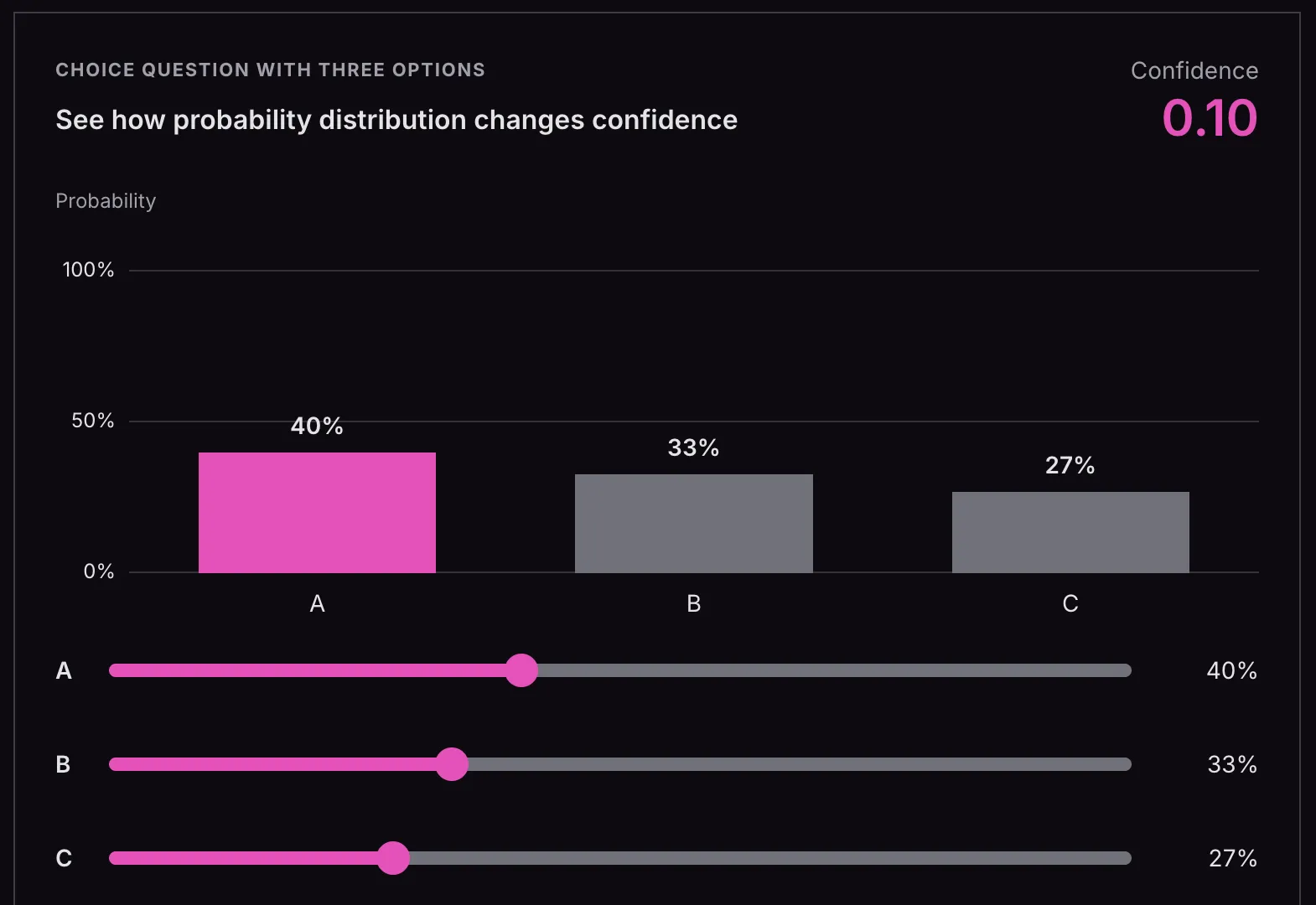
If there is a choice with a high probability, then the confidence score ends up high. 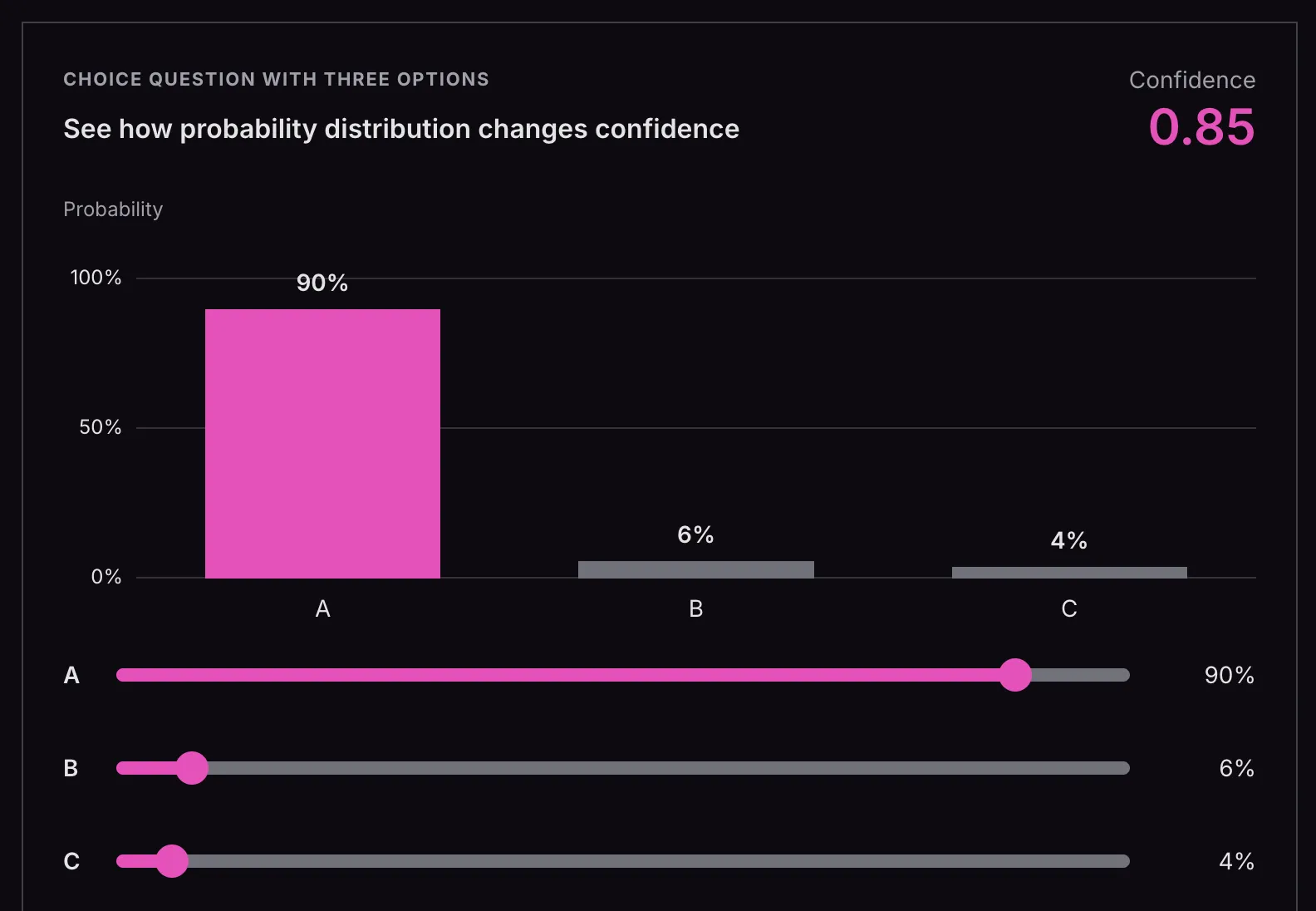
Check out this interactive app on how the confidence changes with different probability distributions across choices: https://docs.typesafe.ai/confidence
For Choice, confidence is calculated from the highest probability and the number of options. It is a convenient summary, but the probabilities can be used directly without it. It does not provide a second, independent reason to trust the answer.
Here is an example of how you might use the confidence value in code. This snippet uses the Python SDK; the functions at the end stand in for application behavior:
response = client.system_one(
state=user_message,
questions={
"action": Choice(
instructions="What is the user trying to do?",
criteria={
"check_balance": "View account balance",
"approve_transfer": "Approve the pending withdrawal request",
"support": "Get help with an issue",
},
),
},
)
action = response.answers["action"]
confidence = action.confidence
if confidence < 0.5:
# Model is genuinely unsure. Don't guess.
route_to_human(user_message)
elif action.choice == "check_balance":
# Low stakes. Showing the wrong screen is recoverable.
show_balance(account_id)
elif action.choice == "approve_transfer":
if confidence > 0.9:
# High stakes, high confidence. Proceed with confirmation.
confirm_then_execute(account_id)
else:
# High stakes, moderate confidence. Verify first.
ask_user_to_confirm(account_id)Noul
The bug question of type noul asked: “Does this ticket report a software bug?”
The request:
state: "I was charged twice for my subscription.",
questions: {
bug: {
instructions: "Does this ticket report a software bug?",
type: "noul"
},
}A noul answer has two fixed fields: type and noul. bug is the custom question name we defined in the request.
answers: {
bug: {
type: "noul",
noul: 0.15
}
}The noul will always be the probability that the answer is “yes,” from 0 to 1. Here, 0.15 means a 15% probability that the ticket reports a software bug. There is no separate confidence field for noul. The single probability already expresses how strongly Jev leans toward yes or no.
Score
The billing_frustration question asked how frustrated the customer sounds, using three ordered levels. The request:
state: "This is the third incorrect charge. I'm tired of chasing you for fixes.",
questions: {
billing_frustration: {
instructions: "How frustrated does the customer sound about their billing issue?",
type: "score",
criteria: [
"Calm: asks about the charge without expressing frustration.", // level 0
"Frustrated: expresses annoyance or dissatisfaction.", //level 1
"Very frustrated: expresses intense anger or threatens to cancel." // 2
]
}
}A score answer has five fixed response fields:
type— always"score".score— the numerical rating on your scale.legend— maps each level’s number to its description from your criteria.probabilities— the probability assigned to each level.confidence— summarizes how tightly the probabilities cluster around the most likely level.
billing_frustration is the only custom field, capturing the label of the question sent in the original request.
answers: {
billing_frustration: {
type: "score",
score: 1.3,
legend: {
"0": "Calm: asks about the charge without expressing frustration.",
"1": "Frustrated: expresses annoyance or dissatisfaction.",
"2": "Very frustrated: expresses intense anger or threatens to cancel."
},
probabilities: {
"0": 0.00,
"1": 0.70,
"2": 0.30
},
confidence: 0.55
}
}The score is calculated by combining probabilities into one number by multiplying each level by its probability and adding the results:
(0 × 0.00) + (1 × 0.70) + (2 × 0.30) = 1.3So 1.3 falls between Frustrated and Very frustrated, closer to Frustrated. Score docs
Box
Our invoice_number question asked Jev to locate the invoice number in the supplied screenshot.
state: {
ticket: "This is the third incorrect charge. I'm tired of chasing you for fixes.",
invoice: "invoice-image-01" // image
},
questions: {
invoice_number: {
instructions: "The invoice number in the screenshot supplied as `invoice`.",
type: "box"
}
},
// Image data is supplied in assets and referenced from state.
assets: { //
"invoice-image-01": {
type: "image",
format: "png",
data_base64: imageBase64
}
},The box response has three fixed fields: type, box, and confidence.
answers: {
  invoice_number: {
    type: "box",
    box: {
      top: 0.70,
      bottom: 0.80,
      left: 0.60,
      right: 0.90
    },
    confidence: 0.95
  }
}Inside box, there are four fixed coordinate fields: top, bottom, left, and right.
The four coordinates describe a rectangle around the invoice number. Each uses a scale from 0 to 1. Here’s a visual illustration:
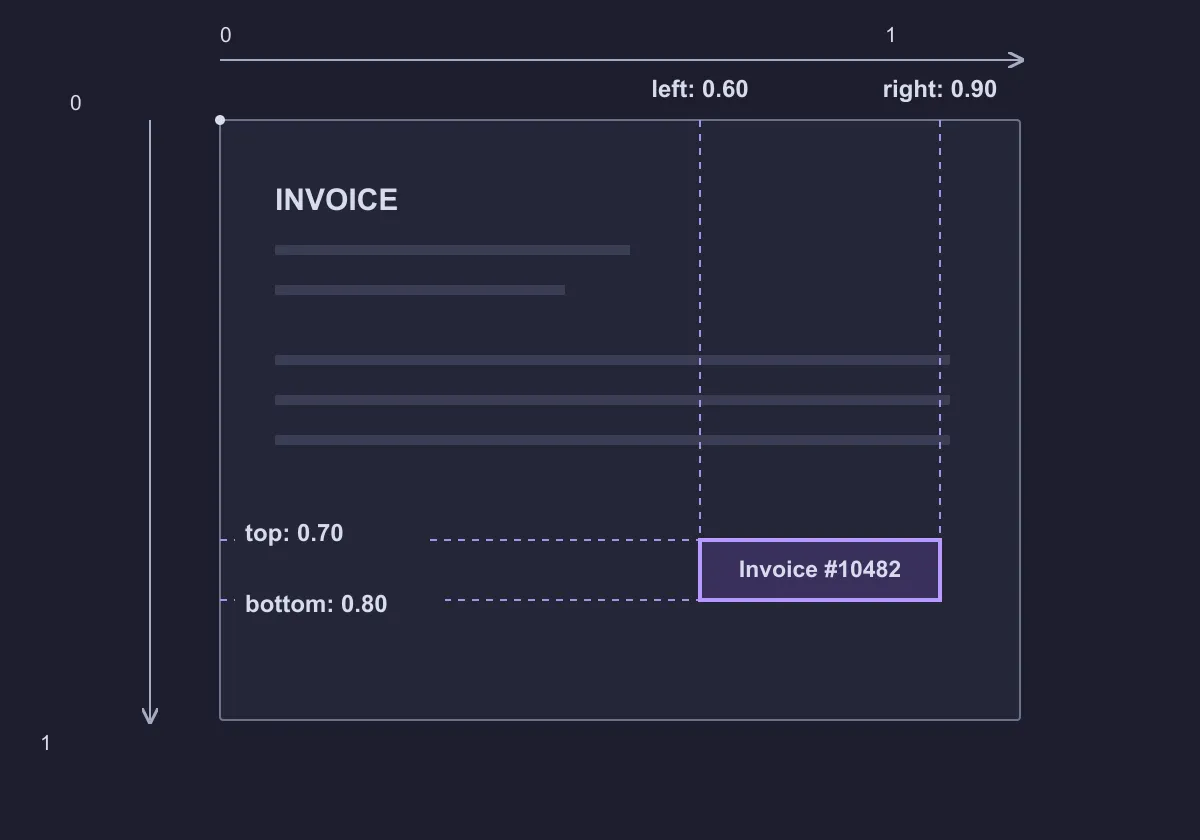 In this example, the rectangle sits near the bottom-right of the screenshot. Your code could then highlight it or crop that area for OCR to read the invoice number. Robotics is also a potential application: Box could locate an object in a robot’s camera image (e.g., a mug to pick up). Other systems would determine its physical position and plan the movement.
A Box answer always returns coordinates, even if the requested target is absent. When that’s possible, you can add a noul question checking whether the invoice number is visible before using the box:
state: {
  invoice: "invoice-image-01"
},

questions: {
  invoice_number_visible: {
    type: "noul",
    instructions: "Is an invoice number visible in `invoice`?"
  },
  invoice_number: {
    type: "box",
    instructions: "The invoice number in `invoice`."
  }
}Complete Response Example
Here is an example of a response that uses all the question types. The probabilities, coordinates, and token counts are illustrative, not the result of a live API call. Fixed field names have a pink background; custom names are indicated in the comments.
{
  answers: {
    billing: { // CUSTOM: question name
      type: "choice",
      choice: "yes",
      probabilities: {
        yes: 0.92, // CUSTOM: option name
        no: 0.08   // CUSTOM: option name
      },
      confidence: 0.84
    },

    bug: { // CUSTOM: question name
      type: "noul",
      noul: 0.15
    },

    billing_frustration: { // CUSTOM: question name
      type: "score",
      score: 1.3,
      legend: {
        "0": "Calm: asks about the charge without expressing frustration.",
        "1": "Frustrated: expresses annoyance or dissatisfaction.",
        "2": "Very frustrated: expresses intense anger or threatens to cancel."
      },
      probabilities: {
        "0": 0.00,
        "1": 0.70,
        "2": 0.30
      },
      confidence: 0.55
    },

    invoice_number: { // CUSTOM: question name
      type: "box",
      box: {
        top: 0.70,
        bottom: 0.80,
        left: 0.60,
        right: 0.90
      },
      confidence: 0.95
    }
  },


  model: "jev-1.14.0",
  usage: {
    input_tokens: 120,
    output_tokens: 12
  }
}Conclusion
Most field names in Jev’s request and response formats are fixed, such as state, questions, type, and answers. Question labels, Choice option names, fields inside a state object, and image references are custom. The structure stays predictable, while the content can change to fit the application.